
Picture this: You just spent ten hours researching, writing, and polishing a comprehensive 2,000-word blog post. It’s packed with industry insights, actionable advice, and compelling data. You hit “publish” and feel a wave of accomplishment.
But then reality sets in.
In today’s fast-paced digital ecosystem, hitting publish is no longer the finish line; it’s the starting gun. To actually reach your audience in 2026, that single blog post needs to become a Twitter thread, three LinkedIn posts, a TikTok script, an email newsletter, and an easily digestible infographic.
You’re suddenly caught in the “content quota trap.” You have the raw material, but manually formatting it for every platform takes almost as much time as writing the original piece.
This is exactly where automating content repurposing with AI changes the game. By leveraging modern AI workflows, you can stop running on the content creation hamster wheel and start building a smart, scalable content engine. Let’s explore how to transform your long-form masterpieces into diverse, platform-optimized formats without losing your brand’s unique voice.
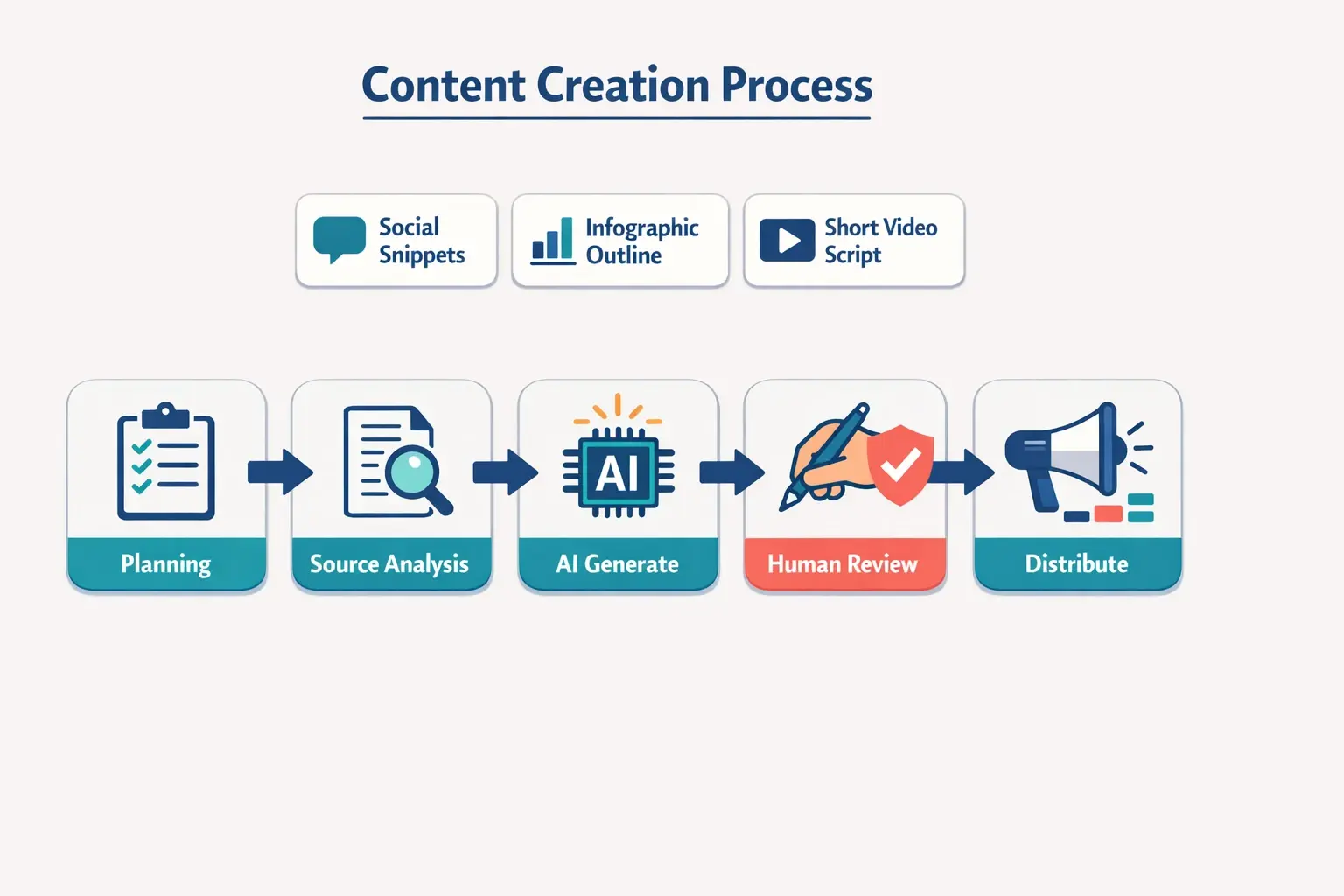
The Foundation: What is AI Content Repurposing?
At its core, content repurposing is the practice of taking a “core asset” (like a long-form blog post, a webinar, or a whitepaper) and adapting it into different formats to reach different segments of your audience.
AI content repurposing applies artificial intelligence to automate the extraction, summarization, and reformatting of this core asset. Rather than simply copy-pasting a paragraph from your blog to LinkedIn, AI analyzes the context of your entire article, pulls out the most engaging hooks, and rewrites them to match the specific cultural nuances of the target platform.
The benefits are transformative:
- Drastically Reduced Production Time: Marketers consistently report cutting repurposing time by up to 65%.
- Extended Content Lifespan: A blog post that might spike in traffic for two days can fuel your social calendar for a month.
- Maximized ROI: You squeeze every drop of value out of the initial time investment it took to create the core asset.
The “AI Slop” Problem and the 70-30 Rule
As AI adoption has matured through 2026, a common beginner misconception has been loudly debunked: AI does not completely eliminate the need for human involvement.
When marketers rely entirely on automation without oversight, the result is often referred to as “AI slop”—generic, repetitive, and hallucination-prone content that sounds like a robot trying too hard to be enthusiastic.
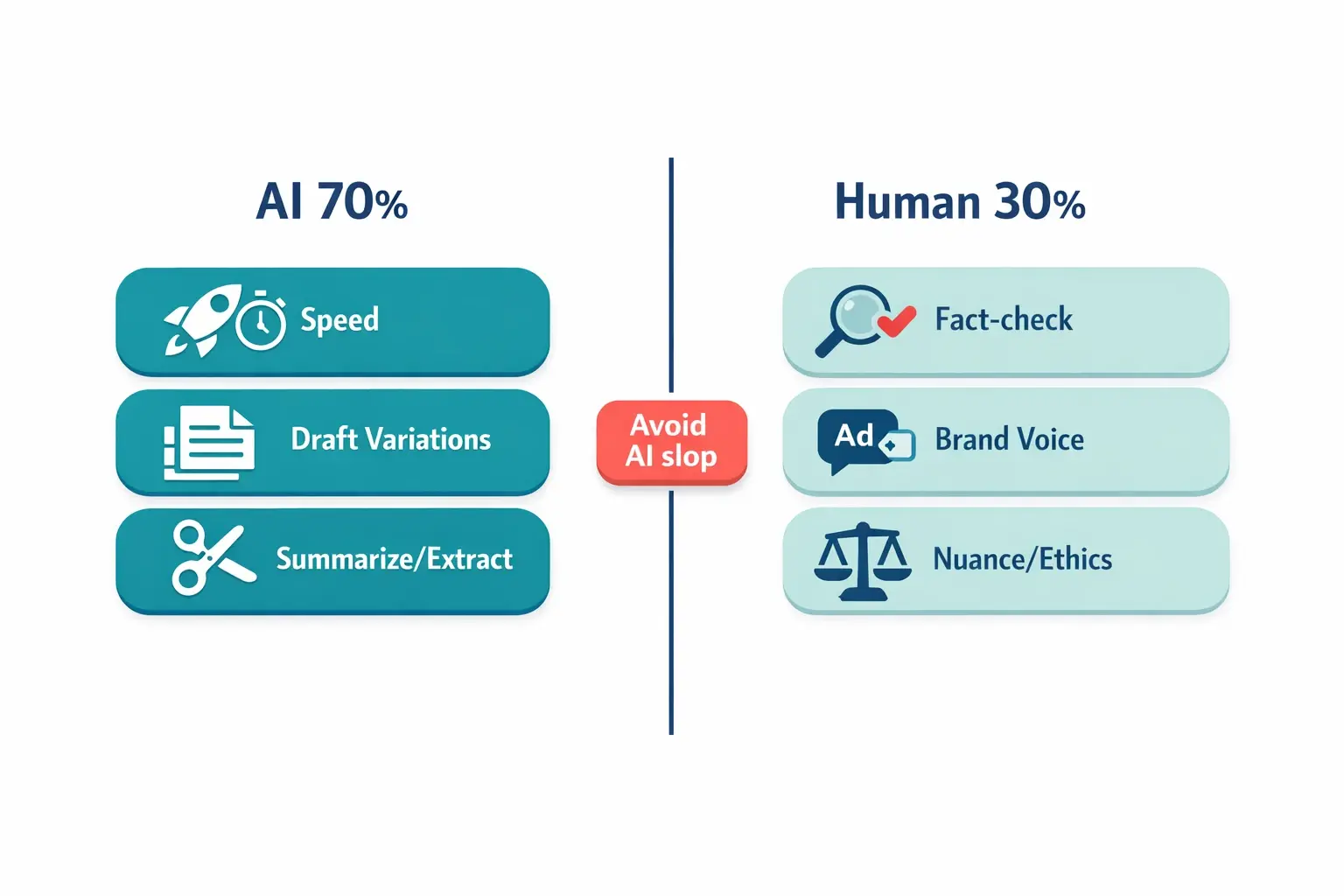
To avoid this, successful teams operate on the 70-30 Rule: AI handles 70% of the work, while human intelligence covers the final 30%.
The AI (70%) is responsible for:
- Speed and volume
- Extracting key themes from thousands of words
- Writing the first rough draft of social posts and video scripts
- Structuring raw data into logical sequences
The Human (30%) is responsible for:
- Strategic nuance and emotional resonance
- Fact-checking and bias mitigation
- Injecting proprietary brand voice and specific stylistic flair
- The final ethical and quality review before publishing
The Master Workflow: From Blog Post to Omni-Channel Assets
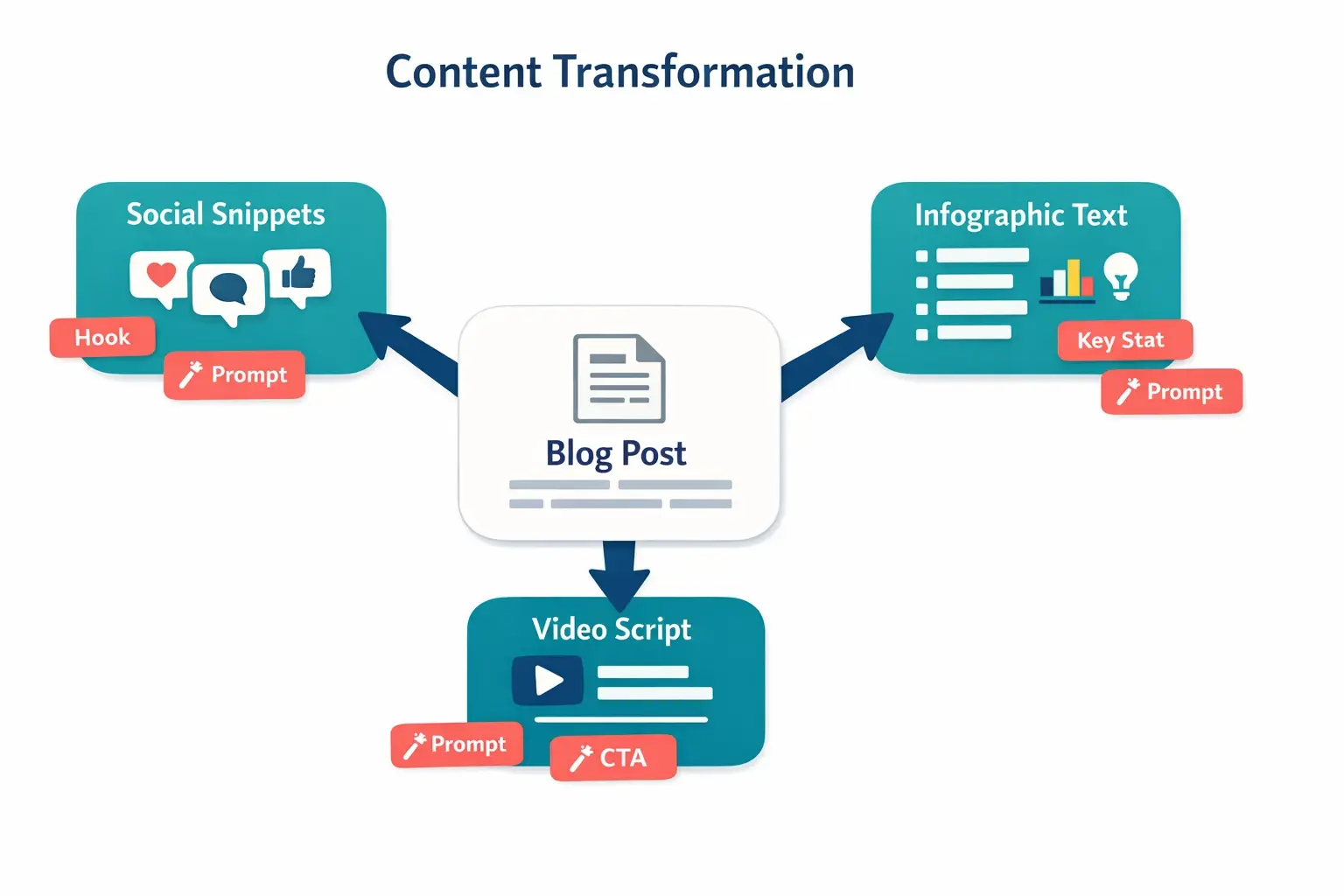
How do you actually move from theory to practice? The key is treating your long-form text as a rich database. Here is a practical, step-by-step framework to transform one blog post into diverse assets.
Step 1: Source Content Analysis and Prompting
Before generating anything, you must feed your AI tool (whether it’s ChatGPT, Claude, or a specialized marketing platform) your source text and clear parameters.
The secret sauce here is instructions. Mastering prompt engineering for marketing ensures your AI understands the intent of the output, not just the words. Don’t just say, “Make this a tweet.” Say, “Act as an expert B2B marketer. Extract the most counter-intuitive statistic from this text and turn it into a provocative, 2-sentence LinkedIn hook. Use a professional but conversational tone.”
Step 2: Transforming into Social Snippets (Text-to-Text)
Every platform demands a different flavor of content. AI excels at translating your core message into these different dialects.
- For LinkedIn/X: Ask the AI to identify your blog’s top three “contrarian takes” or “actionable frameworks” and format them into listicles.
- For Newsletters: Have the AI draft a teaser summarizing the core problem your blog solves, ending with a cliffhanger that drives clicks back to your site.
Step 3: Extracting Infographic Text (Text-to-Visual Prep)
Infographics perform exceptionally well, but designing them requires highly concise, structured text. You can’t paste a 300-word paragraph into a graphic.
The AI Workflow: Prompt the AI to “Scan the provided blog post and extract 5 key statistics, formatting each as a maximum 10-word bullet point suitable for an infographic design. Provide a 3-word title for the overall graphic.” This gives your human designer (or your design AI) the exact scaffolding needed to build a clean, readable visual.
Step 4: Generating Short Video Scripts (Text-to-Video Prep)
Short-form video dominates social feeds. Turning a blog post into a TikTok or Instagram Reel requires stripping away the fluff and focusing on quick, visual pacing.
The AI Workflow: Instruct your AI: “Convert the introduction and main takeaway of this blog post into a 45-second, fast-paced video script. Include visual cues in brackets [like this] for B-roll or text overlays.”
Choosing the Right AI Tools (A Tool-Agnostic Approach)
The market is flooded with tools, but you don’t need a massive software budget to start. When building your workflow, think in categories rather than brand names:
- Text Generation Models: (e.g., ChatGPT, Claude, Jasper). These are your engines for summarization, scriptwriting, and snippet creation.
- Design AI: (e.g., Canva Magic Studio, Midjourney). These take the concise text you generated and help you quickly build the infographic or carousel visually.
- Video Adaptation: (e.g., Descript, Opus Clip). These can either help you record the script your AI wrote or automatically generate B-roll to match your text.
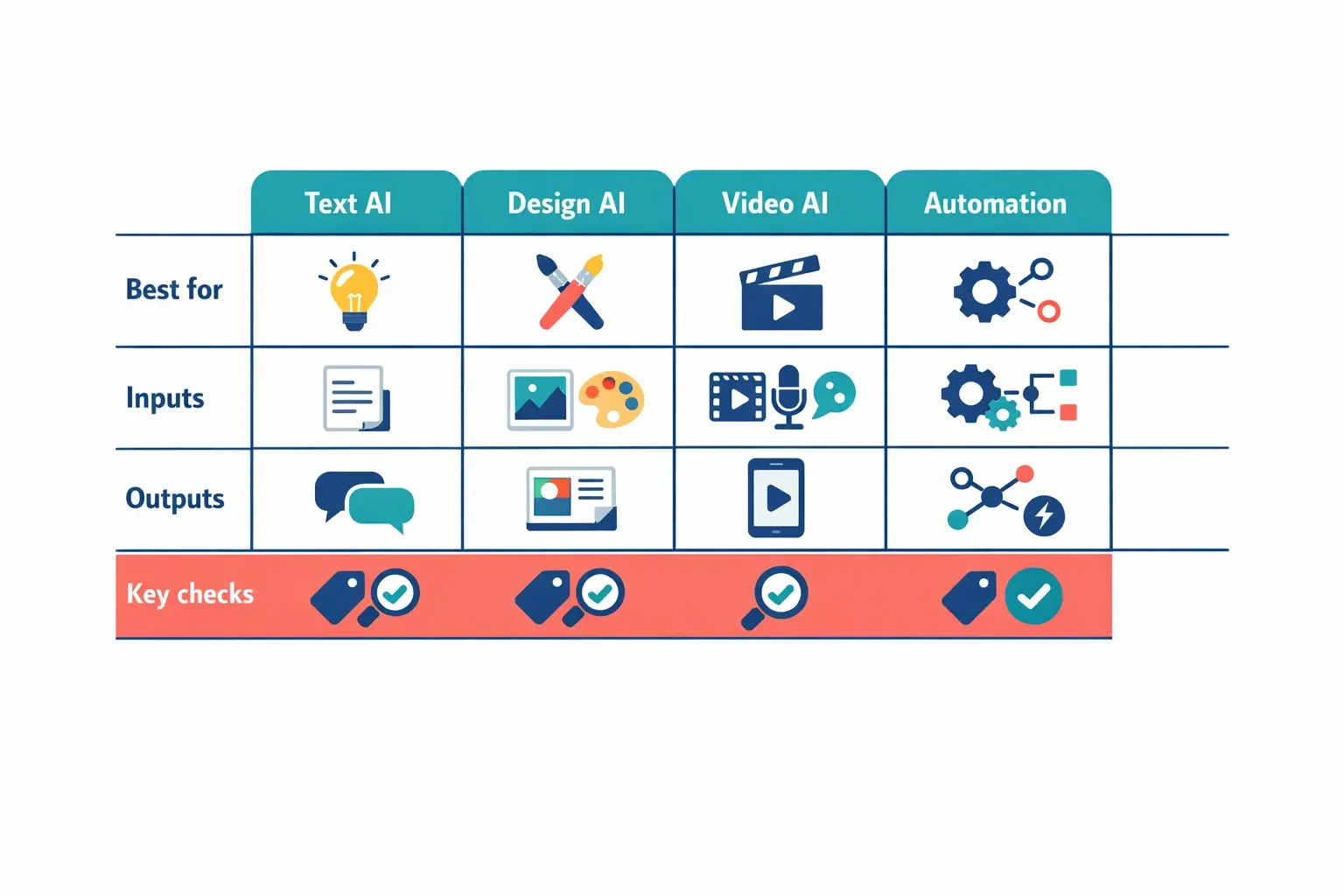
If you’re exploring ai workflow automation saas 2026 solutions, look for platforms that allow you to chain these steps together—for example, a tool that automatically pulls your new RSS blog feed, drafts social posts, and sends them to a dashboard for your human review.
The “Why” Behind the Strategy
It’s crucial to understand why certain formats work. Repurposing isn’t just about presence; it’s about context.
When you look closely at top ecommerce brands that used growth hacking to scale rapidly, a common thread is their ability to multiply one successful piece of content into dozens of contextual touchpoints. A dense, text-heavy blog post serves SEO and deep learners. An infographic born from that post serves visual learners and is highly shareable on Pinterest or LinkedIn. A fast-paced video script extracted from the same post captures shrinking attention spans on TikTok.
By combining AI efficiency with proven growth hacking social media techniques, you can dramatically increase your content’s lifespan, ensuring your message meets your audience exactly where they prefer to consume it.
Frequently Asked Questions (FAQ)
Won’t Google penalize me for duplicate content if I repurpose?
No. Repurposing content into different formats (like turning a blog post into a video or an infographic) is not considered duplicate content by search engines. In fact, driving traffic back to your site from diverse external platforms often signals authority and improves your overall SEO health.
How do I stop the AI from sounding like a robot?
Provide the AI with examples of your past writing. Give it a specific persona (e.g., “Write like a witty SaaS founder speaking to peers”). Most importantly, use the 70-30 Rule: let the AI build the structure, but manually rewrite the opening hooks and closing thoughts in your distinct voice.
Do I need to know how to code to build these workflows?
Not anymore. The modern landscape is built on no-code and low-code integrations. Most major marketing platforms now have simple “transform” buttons built in, and tools like Zapier or Make allow you to connect different apps using simple drag-and-drop interfaces.
How do I measure the ROI of repurposed content?
Track platform-specific engagement (shares, saves, and comments) on the newly created assets. More importantly, use UTM parameters on the links in your social snippets and newsletters to track how much referral traffic and how many conversions are flowing back to your original core asset.
Your Next Steps: Building Your AI Repurposing Engine
Automating content repurposing with AI doesn’t mean flipping a switch and walking away. It means elevating your role from a sheer “content producer” to a “content director.” You provide the core ideas and the final quality check, while AI handles the heavy lifting of formatting and distribution.
To get started this week:
- Pick your highest-performing blog post from the last three months.
- Feed it into your preferred AI text generator.
- Use specific prompts to extract 3 social media snippets, 5 bullet points for an infographic, and one 45-second video script.
- Spend 15 minutes manually editing the results to ensure they sound distinctly like you.
Once you experience the “aha” moment of turning one asset into five within minutes, you’ll never look at a blank screen the same way again. The tools are here, the workflows are proven, and the opportunity to expand your reach is entirely in your hands.